Freight Plus window
Purpose
Use this window to establish carrier and shipping methods for the sale if you are integrated with Freight+.
To access this window
On the Sales Invoice window, click FRT Plus.
Diagram
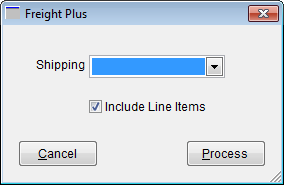
The following thumbnail illustrates the Freight Plus window. Click it to view a full-size image.
Item descriptions
 Fields and boxes
| Item | Description |
|---|---|
|
Shipping |
Select the shipping method you want to use for the sale. Shipping methods are set up on the Freight Plus EDI Info window. |
|
Include Line Items |
Select this check box to use package level detail for this shipment. |
Buttons
| Item | Description |
|---|---|
|
Cancel |
Returns to the previous window. |
|
Process |
Opens Freight+ where you can enter the shipping details. |